Warung Bebas
Showing posts with label WHATS APP. Show all posts

Wednesday, May 27, 2015

How to Hard Reset and Factory Reset Sony Xperia C4

If your Sony Xperia C4  phone has slowed down considerably or isn't working properly, it may be necessary to proceed to a reset. Before you try the factory reset or hard reset on your device,First make sure that you have backup all your important files.       Restoring the default settings or factory reset your device will delete all your existing files and will go back to its initial state.     Factory Reset:   1.First On your Home screen, tap Apps.   2. Go to Settings, and select Backup then reset.   3. Tap on Factory data reset.   4.Then Reset phone.   5.Confirm by tapping Erase everything.   NB:  You just need to wait while your phone deleting your files and restoring your settings to default.    Hard Reset:   1.Turn OFF your phone. Press and hold the Power button, Volume Up and Volume Down buttons all together.   2.There should a menu will appear on your phone. (If it does not work, try to Press and Hold the Power button)   3.Press the Volume down button to navigate to the Recovery option.   Press the Volume Up to select (if that doesn't work, use the Power button to select).   4.An Android logo will appear.  Press the Volume Down and Volume Up button together and a recovery menu should appear.  Use the Volume buttons to move to the Wipe data/Factory reset option and then press Power to select.   5.Use the Volume Down key to choose Yes and press the Power button again to select.

If your Sony Xperia C4  phone has slowed down considerably or isn't working properly, it may be necessary to proceed to a reset.
Before you try the factory reset or hard reset on your device,First make sure that you have backup all your important files.


  Restoring the default settings or factory reset your device will delete all your existing files and will go back to its initial state.

Factory Reset:

1.First On your Home screen, tap Apps.

2. Go to Settings, and select Backup then reset.

3. Tap on Factory data reset.

4.Then Reset phone.

5.Confirm by tapping Erase everything.

NB:
You just need to wait while your phone deleting your files and restoring your settings to default.


Hard Reset:

1.Turn OFF your phone. Press and hold the Power button, Volume Up and Volume Down buttons all together.

2.There should a menu will appear on your phone. (If it does not work, try to Press and Hold the Power button)

3.Press the Volume down button to navigate to the Recovery option.
 Press the Volume Up to select (if that doesn't work, use the Power button to select).

4.An Android logo will appear.
Press the Volume Down and Volume Up button together and a recovery menu should appear.
Use the Volume buttons to move to the Wipe data/Factory reset option and then press Power to select.

5.Use the Volume Down key to choose Yes and press the Power button again to select.

Saturday, May 23, 2015

How to reset your BlackBerry z10 Hub

The BlackBerry Hub is a great way to keep track of all your notifications but sometimes, it can get a bit too crowded.   To reset your BlackBerry Hub, simply swipe from the top right bezel to the center of the screen five times in a row.   This will reset those notifications and you'll then see a "preparing BlackBerry Hub" notice.

-The BlackBerry Hub is a great way to keep track of all your notifications but sometimes, it can get a bit too crowded.

-To reset your BLACKBERRY Z10 Hub,Its simple here you have to swipe from the top right bezel to the center of the screen five times in a row.

-This will reset those notifications and you'll then see a "preparing BlackBerry Hub" notice.

Sunday, July 6, 2014

WHATSAPP:: How To Make WhatsApp Free For Lifetime

WHATSAPP:: How  To  Make   WhatsApp Free  For  Lifetime

As every one knows WhatsApp is the Fastest Growing Messenger for Mobile Phones. WhatsApp is highly downloadable mobile application now days. Every one who use internet on mobile always use WhatsApp, instead of using sms from number to everyone because sms needs to activate costly packs which offers limited messages but WhatsApp allow to send unlimited messages with good interface and inbuilt number of amazing features like sharing videos, images, audios or any other files as you want

But the  Problem with Whatsapp is that its free subscription is just for one year. Means due to program policies of Whatsapp you can use it free for one year for every new installation. Then after completing 1st year you have to pay $0.99 to activate Whatsapp for next year. So here i will try to introduce amazing trick about making Whatsapp free after completing 1 year.

I know $0.99  is little bit amount and everyone can easily afford to pay, So if your are not interested to do this then Just suggest you read it for fun because our aim is to increase your knowledge only.


BELOW ARE STEPS TO MAKE WHATSAPP FREE FOR LIFE TIME .

1. If you have any android phone or other mobile where you already install Whatsapp then i suggest you to  delete your account and uninstall Whatsapp  from your device.

2. Now you need iOS device i recommend you to use iPhone for this. If you already then follow steps. if not Borrow it from you friend or any other person.

3. Make sure that they do not  have already installed Whatsapp. If they do not having Whatsapp already then you need to download it from iTunes search like Whatsapp for free because iTunes Offers sometime free apps.

4. Now Install Whatsapp in iOS. After the installation, Activate your mobile number and verify it.

5. After the verification, now use your Activated number on your own device and Check your Service time it is extended to Lifetime.


READ MORE ON WHATSAPP

Whatsapp::15 Best Whatsapp Tricks and Tips


WhatsApp::Whatsapp Lock for Android.


WHATSAPP::How to install WhatsApp on PC/laptop


ENJOY!!

Monday, June 30, 2014

Whatsapp::15 Best Whatsapp Tricks and Tips

Whatsapp::15 Best Whatsapp  Tricks  and  Tips

Whats app Messenger can be used to send pictures, videos, maps, audio or texts to anyone anywhere around the world free of cost. Only there has to be data connection by network provider or WI-Fi device.

Now a lot of people have a tendency to know about various tricks regarding any app. So there are many
Whats app Tips and trick as well.So Here are few of those WhatsApp TIPS AND TRICK

BELOW ARE 15 WHATSAPP TIPS AND TRICKS

1. There is a way to spy on someone else’s account in Whatsapp. All it needs to be done is that the Settings of the rooted phone have to be opened. Then the MAC address of phone’s Wi-Fi has to be noted.

2. There is a trick to use Whatsapp without using a person’s number, this is done by tricking the verification request which is asked after installation of Whatsapp.

3. The messages deleted by someone can be obtained by transferring the msgstore.db.crypt file to some other phone and restored in other phone’s Whatsapp.

4. By using an app called Magiapp, one picture can be sent to another picture.

5. Whatsapp does not allow anyone to download the profile pictures of others for different security reason, but actually these are automatically downloaded when one sees it, on the memory card.

6. Those who love to prank, there is an app for creating fake conversation. It is done with the help of Whatssaid.

7. There is a way to prank friends by changing their profile picture on a particular phone. A pictures’ name and resolution has to be changed and saved on phone.

8. With Cloud Send, people can share PDF, APK, ZIP and DOC file on Whatsapp.


9. With the help of Whatsapp plus, profile picture can be hidden or stopped from being downloaded.

10. The Last seen feature of Whatsapp can be blocked by installing the Block Whatsapp last seen app.

11. The automatic image download can be disabled by installing Whatsapp plus app.

12. The Whatsapp free validation can be extended up to 2022 by installing Whatsapp with a number in two different phones, one iPhone and one android alternatively once.

13. Multiple Whatsapp account can be maintained in a single rooted phone with SwitchMe multiple accounts app.

14. Whatsapp can be used without SIM using the WLAN connection on phone.

15. Whatsapp conversation can be hacked using Whatsapp Sniffer.


WhatsApp::Whatsapp Lock for Android.

WhatsApp::Whatsapp Lock for Android.

This app will lets you protect your WhatsApp privacy through a PIN.

After process installation it will ask you to insert a 4 digit PIN, and will show the configuration options to lock WhatsApp

You can customize auto-lock time, so you do not need to enter the PIN every time you change task on your device .

If you may enter a wrong pin and your phone has front camera, it will take a picture of the intruder within a very short of time and saved in the photo gallery.

Have fun in detecting the intruder {Only devices with front camera}

★ It's free and it  has no limitations.

★ It keep your messages safe

★ It Capture intruders when wrong PIN entered. 

★ Customize autolock time

★ Do not make you crazy with strange advertising.

★ It is ultra lightweight. Uses low resources and space.

★ Minimun special permissions required

★ Design attractive and simple user interface.

NOTE THAT: This application is not related to Whatsapp Inc.

Saturday, June 28, 2014

WHATSAPP::How to install WhatsApp on PC/laptop

How to install  WhatsApp  on PC/laptop
Most of the phones now days are using WhatsApp as one of the most used App. But now you can also use it in PC. This will not require for you to carry your phone at any time. You can enjoy its features in your PC or Laptop.

You can install WhatsApp using Youwave, another great application to run Android Apps on PC. You will be able to download various Android Apps with it. This application offers you the latest edition Android ICS 4.0.4. You can also download Android free games with this App. This software also let you to import application to run in it. Youwave is not a free software, but you will get 10 days free trial.

You will require minimum Intel Pentium 1.6 GHz CPU, 1.5GB DRAM, 500MB disk space. And windows XP,Vista, windows 7, windows 8, 32/64 bits.


STEPS TO FOLLOW

1.download Youwave and Install now.

2. Run Youwave to open it Click view then Online content.

3. Double click on online app {WhatsApp} to Install or browse the store.

4. Now after the download, click view-apps. And double click to install WhatsApp.

Finally you are done now with this simple steps to install WhatsApp.Then  Double-click to launch the WhatsApp in your PC or Laptop.

Now choose to Agree and continue. After that follow the steps as the same thing you do on cell-phone. You have to give your country code and phone number .

After you finish all this things import all your contact in PC  and are ready to go live. You can have the fun with your WhatsApp now.

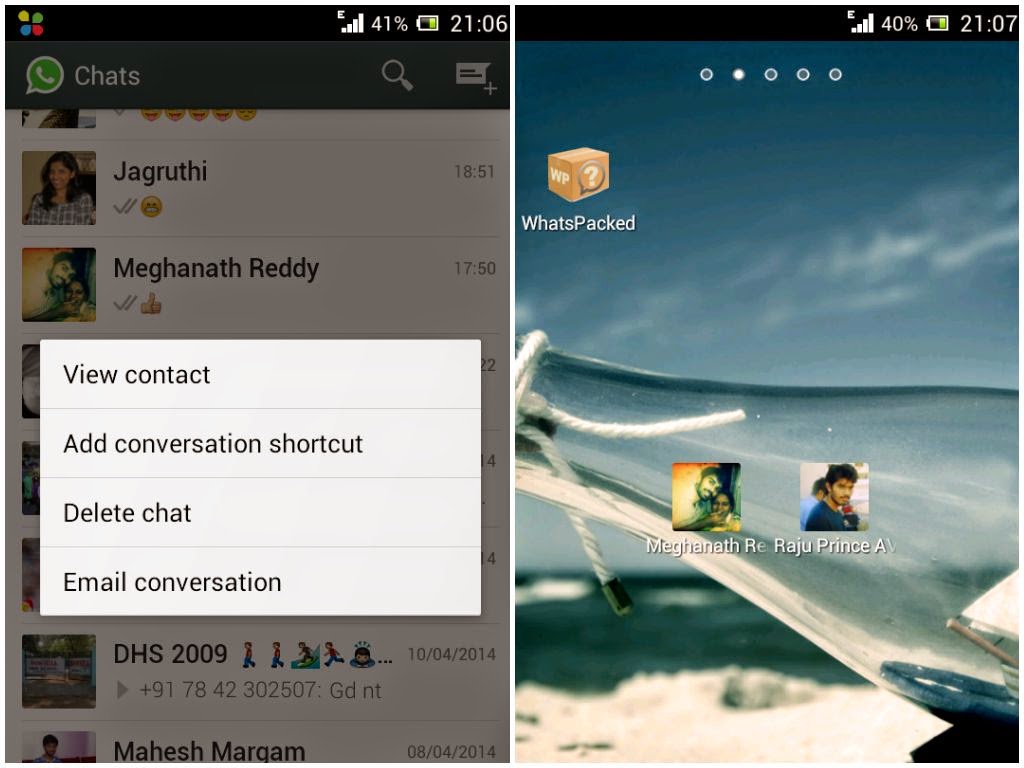
WHATS APP::How to Create a Shortcuts for Important Contacts

Here is a simple trick on how to create a shortcut for Whats App contacts. when using Android phones you can easily create a shortcut for a Group or a Contact by having a long press on it. A tab will pop up and then select add conversation shortcut.A shortcut will be created for any contact or group.

 WHATS APP

But it is not easy in case of IOS so for that you need to install a third party application which called 1TapWA to get this feature. This app also has some extra features like photo editing and action scheduler.

WHATS APP::Change Your Mobile Number on WhatsApp without losing any chat history.

Do you want to change your SIM Card and then continue with the same Phone there is no need to uninstall and reinstall Whats App to change Whats App number.

Change  Your Mobile  Number on WhatsApp without  losing any  chat history.

There is a default option available on Whats App to change mobile numbers. For that go to Settings then Account and Change number. Enter both old and new phone numbers and click Done.
Now you already verify your new number all the Groups, messages will be migrated to your new Phone number.

WHATS APP::How toHide your Mobile number in WhatsApp Groups.

How toHide your Mobile number in WhatsApp Groups

If you want to keep your mobile number disclose to others in whats app then this is simple trick for you.
Follow the steps below.

1. First of all you need to uninstall and reinstall WhatsApp on your Android Phone.

2. In the step of verification,you have to put your mobile in flight mode or change the message center number.

3. Select Verify through sms and enter your email id and then Click on send. Now Without wasting a second, click on Cancel. This will terminates the authorization process.

4. Now you have to spoof that message, for that download Spoof Text message.

5. Now go to your Outbox and then Copy the message details of Spoof App then send it to Spoofed Verification

6. Use the below details
To: +447900347295
From: +(Country code)(mobile number)
Message: Enter you email id

Now a message will be sent through that spoofed number and that Spoofed number is visible to all others instead of your original mobile number.
 

ONE TECHNO Copyright © 2012 Fast Loading -- Powered by Blogger